
Modules are the building blocks of every role in Clean Smarts. Each module is one capability, such as clocking in from a phone, completing checklists, editing schedules, or messaging customers. Turn a module on for a role and everyone with that role gets that capability, on both the web portal and the mobile app.
This article lists every module and explains two things for each one: what it unlocks in the web portal that you use as an administrator, and what it changes in the mobile app that your field team uses. If you just want to create or assign a role, start with How do I create and manage user roles? and come back here when you need to know exactly what a module does.
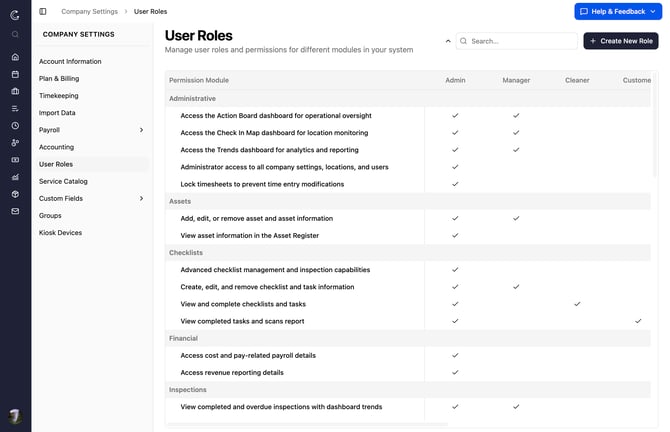
Two Rules That Apply to Every Module
Before the list, two things shape how every module behaves:
- Location access gates almost everything. Most modules only let a person act on the locations they're assigned to. A cleaner with the inspection module still only sees inspections for their own sites.
- Manage Account is the exception. The Manage Account module grants account-wide access and exposes all users and locations regardless of location assignments. Treat it as your administrator-level switch and hand it out carefully.
One more note on names: the Cleaner role is the default name for your front-line worker. If you've renamed that role for your company, you'll see your custom name wherever this article says "Cleaner."
Administrative
These modules control company-wide dashboards and account settings. They live in the web portal.
|
Module |
In the web portal |
On the mobile app |
|---|---|---|
|
Dashboard (Action Board) |
Opens Dashboards > Action Board for day-to-day operational oversight. |
Not used. |
|
Dashboard (Check In Map) |
Opens Dashboards > Check In Map to see where people are clocking in. |
Not used. |
|
Dashboard (Trends) |
Opens Dashboards > Trends for analytics and reporting. |
Not used. |
|
Lock Time Entries |
Locks timesheets so time entries can no longer be edited. |
Not used. |
|
Manage Account |
Full administrator access: change company settings, see all users and locations regardless of location access, and remove messages from chats. |
See all users and locations regardless of location access. |
Users
These modules control who can see and edit people in your account.
|
Module |
In the web portal |
On the mobile app |
|---|---|---|
|
Users (View) |
Opens Manage Users to view profiles (read-only). |
Opens the Users screen to view profiles. |
|
Users (Edit) |
Opens Manage Users to edit profiles and settings. |
Opens the Users screen to edit profiles. |
|
Users (See All) |
Shows every user in the company, regardless of location access. |
Shows every user in the company, regardless of location access. |
Locations
These modules control who can see and manage your service locations.
|
Module |
In the web portal |
On the mobile app |
|---|---|---|
|
Locations (View) |
Opens Manage Locations to view location information (read-only). |
Not used. |
|
Locations (Edit) |
Opens Manage Locations to edit locations and add supplies and checklists to them. |
Not used. |
|
Facilities (Company) |
Manage facility information and settings. |
Not used. |
|
Locations (Mobile Only) |
Not used. |
Adds a check-in button when someone taps a location from the List or Map view, so they can clock into sites they aren't scheduled for. Without it, there's no check-in button on those screens. |
Scheduling
These modules control the calendar, shifts, and work orders.
|
Module |
In the web portal |
On the mobile app |
|---|---|---|
|
Schedule (Cleaner View) |
Not used. |
Shows a worker their own schedule and sends a reminder if they're late for a shift. |
|
Schedule (View Only) |
View shifts, work orders, and inspections from the calendar and Manage Locations. |
View shifts, work orders, and inspections in My Jobs. |
|
Schedule (Assign Only) |
Assign people to shifts from the calendar, Manage Locations, or Assign Cleaners, without changing shift times or settings. |
Assign people to shifts from the shift details screen. |
|
Schedule (Edit) |
Create and edit shifts, work orders, and inspections from the calendar and Manage Locations. |
View and manage shifts, work orders, and inspections. |
|
Work Orders (View) |
Opens Manage Work Orders to view work orders. |
Opens the Work Orders screen to view work order information. |
|
Work Orders (Edit) |
Opens Manage Work Orders to add, edit, or remove work orders. |
Add and edit work orders from the Work Orders screen. |
Timesheets
These modules control the time clock, time reports, and check-in notifications. This is where most of your mobile workforce settings live.
|
Module |
In the web portal |
On the mobile app |
|---|---|---|
|
Timetracking (Check in) |
Not used. |
Shows the clock-in and clock-out buttons and sends the person their own late reminders. Without it, there's no time clock on the phone. |
|
Group Check-In |
Not used. |
Lets a crew lead clock teammates in and out from the shift details screen. |
|
Timetracking (Edit) |
Opens the full Time Tracking reports (approve hours, time detail, modification log, budget-to-actual, no-shows, open check-ins, and more) to create, modify, delete, and approve other people's time. Includes late and no-show notifications. |
View, create, and modify other users' time. |
|
Timetracking (View others' time) |
Opens the same Time Tracking reports as Edit, but view-only. |
Receive late and no-show notifications for others. |
|
Timetracking (Approve) |
Opens the Approve hours and time detail reports to approve hours. |
View others' time. (Approving from the phone is planned for a future update.) |
|
Geolocation (Company) |
View the out-of-bounds check-in report and get notified when someone checks in or out outside a geofence. |
Get notified when someone checks in or out outside a geofence. |
|
Survey Results |
Opens Time Tracking > Health and Attendance Surveys and sends notifications when someone reports a survey exception. |
Get notified when someone reports a survey exception. |
|
No-show Notices |
Not used. |
Get a no-show notification when someone doesn't clock into a shift at a location you have access to. |
Checklists
These modules control checklists and tasks, the core of the cleaner's daily mobile workflow.
|
Module |
In the web portal |
On the mobile app |
|---|---|---|
|
Checklist (Cleaner) |
Not used. |
View and complete checklists and tasks. |
|
Checklist (Company) |
Opens Manage Checklists to create, edit, and remove checklists and tasks, and add them to locations. |
View and complete checklists and tasks. |
|
Checklist (Inspector) |
Advanced checklist management and inspection capabilities. |
Advanced checklist and inspection capabilities. |
|
Checklist (Customer) |
View the Completed Tasks and Scans report. |
View checklists and tasks. |
Inspections
These modules control who can see inspection results.
|
Module |
In the web portal |
On the mobile app |
|---|---|---|
|
Inspections (Cleaner) |
View completed inspections. |
View completed inspections and get notified when one is finished. |
|
Inspections (View) |
View completed inspections. |
View completed inspections and get notified when one is finished. |
|
Inspections (Company) |
View completed and overdue inspections, plus inspection data in Dashboard Trends. |
View completed inspections and get notified when one is finished. |
Issues
These modules control who can report and manage issues from the field.
|
Module |
In the web portal |
On the mobile app |
|---|---|---|
|
Issue (Cleaner) |
Not used. |
Create and edit unassigned issues, or issues assigned to them (internal or customer-reported). |
|
Issue (Company) |
Create and edit any issue, and make internal issues visible to customers. |
Create, edit, and assign any issue, and make internal issues visible to customers. |
|
Issue (Customer) |
Create issues and see customer-reported issues. |
Create issues and see customer-reported issues. |
Supplies
These modules control supply requests, quantities, and costs.
|
Module |
In the web portal |
On the mobile app |
|---|---|---|
|
Supplies (Request) |
Not used. |
Create, close, and fulfill supply requests. Without Supplies (Edit), the person won't see costs. |
|
Supplies (Set Quantity) |
Not used. |
Set supply quantities at a location. |
|
Supplies (Edit) |
Opens Manage Supplies and Manage Suppliers to add, edit, and remove supplies, modify and close requests, and view the Cost and Levels report. |
Create, close, and fulfill requests, set quantities, and see supply costs. |
Messaging
These modules control chat. Internal team chat and customer chat are separate, so grant them deliberately.
|
Module |
In the web portal |
On the mobile app |
|---|---|---|
|
Messaging (Cleaner) |
Opens the Message Center for internal company and custom group chats. |
Opens the Messages page for internal company and custom group chats. |
|
Messaging (Company) |
Opens the Message Center for internal company and group chats, and can forward an internal location chat to the customer chat (when the person also has Messaging (Customer)). |
Opens the Messages page for internal company and group chats. |
|
Messaging (Customer) |
Opens the Message Center for customer (external) and custom group chats. |
Opens the Messages page for customer (external) and custom group chats. |
Financial
These modules expose money. Reserve them for the people who handle payroll and billing.
|
Module |
In the web portal |
On the mobile app |
|---|---|---|
|
Costs |
Access cost and pay-related payroll details. |
Reflected wherever costs appear. |
|
Revenue |
Access revenue reporting details. |
Reflected wherever revenue appears. |
Services
The Services modules are mostly retired.
|
Module |
In the web portal |
On the mobile app |
|---|---|---|
|
Services (Company) |
Opens Manage Services to create, edit, and remove service items. |
Not used. |
|
Services (Cleaner) |
Deprecated. |
Deprecated. |
|
Services (Customer) |
Deprecated. |
Deprecated. |
Assets (Expert Tier Only)
Available on the Expert tier.
|
Module |
In the web portal |
On the mobile app |
|---|---|---|
|
Assets (View) |
Opens the Asset Register to view asset information. |
Opens the Assets screen to view asset information. |
|
Assets (Edit) |
Opens the Asset Register to add, edit, or remove assets. |
Opens the Assets screen to add, edit, or remove assets. |
Training Media (Expert Tier Only)
Available on the Expert tier. These modules are mobile-only.
|
Module |
In the web portal |
On the mobile app |
|---|---|---|
|
Training (Cleaner) |
Not used. |
View training photos and videos attached to tasks. |
|
Training (Company) |
Not used. |
Upload training photos and videos for tasks. |
The Modules Your Mobile Team Feels Most
If you're building a role for field staff, these are the modules that change daily life on the phone. Match them to what the job actually requires:
- Timetracking (Check in) turns the time clock on. No other module replaces it.
- Locations (Mobile Only) lets people clock into sites they aren't scheduled for.
- Group Check-In lets a crew lead clock the whole team in and out.
- Checklist (Cleaner) is the heart of the cleaning workflow.
- Schedule (Cleaner View) shows a worker their shifts and late reminders.
- Issue (Cleaner) lets staff report problems from the field.
- Supplies (Request) lets staff ask for and restock supplies.
- Messaging (Cleaner) opens internal team chat. Add Messaging (Customer) only when someone should talk to clients directly.
- Inspections (Cleaner) lets staff see completed inspections for their sites.
A good habit: start every field role from Cleaner, then add only the modules the job needs. It keeps the phone app focused and avoids handing out account-wide access by accident.
Default Roles Come Pre-Configured
You don't have to assemble modules from scratch. Clean Smarts ships with four default roles, Admin, Manager, Cleaner, and Customer, each pre-loaded with the modules most teams expect. Pick one on a user's profile and the right modules come with it.
Need something in between? Build a custom role from the closest default, then add or remove individual modules. See How do I create and manage user roles? for the step-by-step.